
AI coding tools will build almost anything you describe, in minutes. What they rarely do on their own is ask whether it’s the right thing to build. So the quality of what you make now depends less on how fast you write code and more on the ideas you bring: the alternatives you think of and the defaults you’re willing to question. That’s brainstorming, and you can get better at it.
Here’s a small, real example from last week, and the habits it points to.
Two questions that made an app simpler
We built a small app that a hospital ward uses to schedule its patients, with Claude writing all of the code. Each appointment had a time field, and the app warned you when two patients got the same time with the same doctor, like most booking apps do.
Using it on a phone, two things felt off. Both turned into questions.
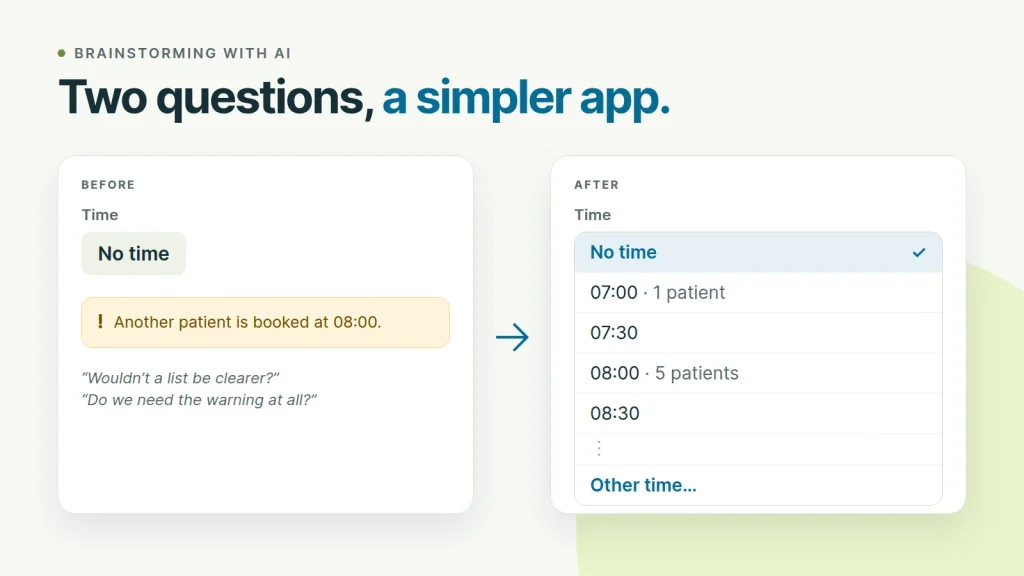
“Wouldn’t it be better to pick the time from a list, with ‘No time’ as the first option?”
The time field was a button that said “No time”. Nothing about it suggested you could tap it to choose a time. Claude agreed and explained why a list works better: a plain dropdown with “No time” first, then 07:00, 07:30, 08:00 and so on, is understood at a glance, and on a phone it opens as a scrolling list instead of the keyboard.
It also looked at the real appointments before changing anything: 38 of the 40 with a time were on the hour or half hour. So an “Other time…” option at the end of the list covers the rare exact time, like 10:15.
“Or should I remove the warning entirely, and make ‘no time’ the default?”
Claude agreed again. On this ward, patients arrive in the morning and wait to be seen, so a time isn’t a real booking slot. The double-booking warning showed up almost only in normal use, when someone added a second patient at 08:00 for the same doctor. It interrupted people without protecting anything.
So we replaced the warning with something quieter. New appointments start with no time, and you pick one only if you need it. The time list now shows how many patients the doctor already has at each time that day, like “07:00 · 1 patient” and “08:00 · 5 patients”. You see how busy a time is before you choose it, and nothing gets in your way. Two patients at the same hour simply show one under the other in the hourly view.
The AI wrote all the code, and wrote it well. But neither improvement was its idea. The first version looked like a typical booking app, because nobody had said how the ward actually works. Once asked, the AI was very good at judging each idea: it gave reasons, checked the data and made the change in minutes.
Why this matters more when AI writes the code
- Code got cheap, ideas didn’t. When a change takes minutes instead of days, you can try far more ideas. How many good ones you come up with becomes the limit.
- AI builds what you ask for. Ask for a time picker and you get a good time picker. Ask whether you need one at all and you may get a better answer. The question decides the result.
- You know things the AI doesn’t. How your users work, what annoys them, what they ignore. The ward’s routine wasn’t in any prompt until someone brought it up.
Five habits for better ideas
- Use it like a user, on the real device. Both questions above came from looking at the screen on a phone, not at the code. Is it obvious what you can tap? What do you have to read twice?
- Ask “what if we removed it?” Every warning, setting and extra field has a cost, and people learn to click past warnings that are usually wrong. Removing something is often the best change, or replacing it with something quieter, like a count next to each time instead of a warning.
- Question the defaults. Most people keep whatever a form starts with, so the default is most of the design. “What should a new item start as?” is worth asking about every form.
- Check ideas against real data. “Most times are on the half hour” was a guess until someone counted: 38 of 40. An AI tool will count for you if you ask.
- Ask for options before code. Instead of “add a time picker”, try something like this:
Before you write any code: give me three different ways to let people set an appointment time on a phone, with the trade-offs of each. Which would you pick for people in a hurry, and why? What could we remove instead?
You still make the call. But you’re choosing between several ideas instead of accepting the first one.
The same skill wins coding interviews
Coding interviews test this directly. Strong candidates don’t start typing as soon as they’ve read the problem. They state a simple approach, ask what makes it slow, and list a couple of better ideas before choosing one.
Take Two Sum: find two numbers in a list that add up to a target. The first idea is to check every pair, which takes O(n²) time. Asking “what work am I repeating?” leads to the next one: remember each number you’ve seen in a hash map, so for each new number you can look up its partner in O(1). That’s O(n) overall. When an interviewer asks “can you do better?”, this is what they want to see: more than one idea, compared out loud. We go deeper in how to get from brute force to an optimal solution.
You can practice it step by step in the Two Sum lesson, or in an AI mock interview, where the interviewer asks you to explain your approach and its complexity before you code. Your first one is free.
AI made code fast. The ideas are still yours to bring.