
Prompt vs Skill vs Harness: The Simple Difference for AI Builders
A common piece of advice in AI engineering is:
“Use a frontier model to build the harness, then execute with an open-source or cheaper model.”
At first, this sounds confusing. What is a “harness”? Is it just a prompt? Is it the same thing as a skill? Is it a fancy name for an AI agent?
Not quite.
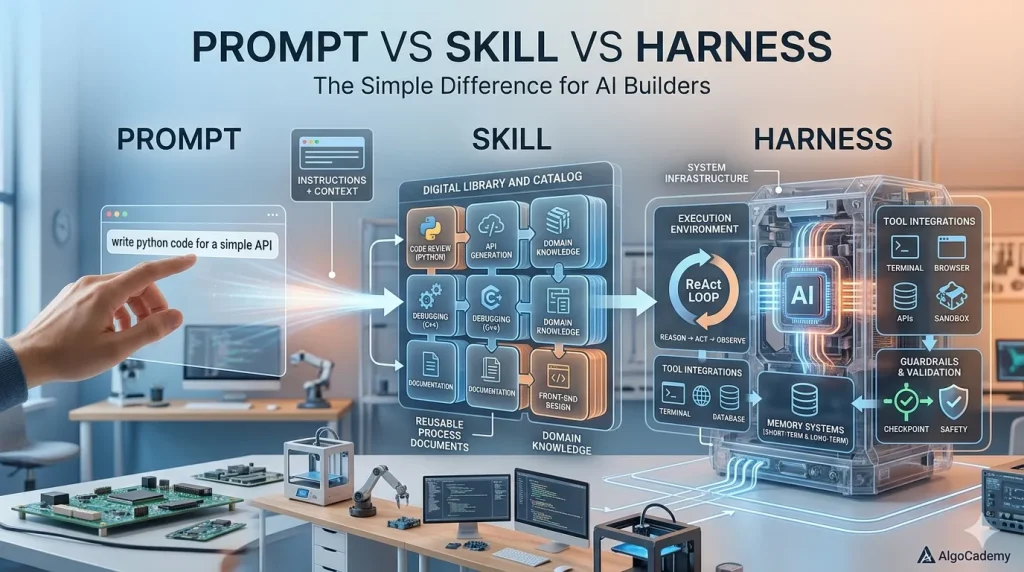
To understand how modern AI systems are built, it helps to separate three layers:
- Prompt
- Skill
- Harness
They are related, but they are not the same thing.
The Simple Difference
A prompt is an instruction you give the model.
A skill is a reusable capability or behavior pattern.
A harness is the full system around the model that makes the behavior reliable.
In short:
Prompt = what you ask the model to do.
Skill = how the model should perform a type of task.
Harness = the system that controls, tools, tests, validates, and repeats the task.
Let’s break this down.
What Is a Prompt?
A prompt is the most basic layer.
It is the direct instruction given to the model.
For example:
Explain this coding mistake to a beginner.
That is a prompt.
A slightly better prompt might be:
Explain this coding mistake to a beginner.
Do not give the full solution.
First identify the bug, then give a small hint.
This is still just a prompt. It tells the model what to do in one specific interaction.
Prompts are useful, but they are fragile. A prompt can work well on one example and fail on another. It can be too vague, too broad, or too dependent on the model’s intelligence.
A strong model may infer the right behavior from a weak prompt. A smaller or cheaper model usually needs more structure.
That is where skills come in.
What Is a Skill?
A skill is a reusable pattern for doing a category of tasks.
Instead of writing a one-off prompt every time, a skill defines a repeatable behavior.
For example, imagine you are building an AI tutor for coding students.
A simple prompt might be:
Explain the student’s mistake.
But a skill would be more structured:
Skill: Explain Coding Mistakes
When a student submits incorrect code:
1. Identify the likely bug.
2. Explain the misconception behind the bug.
3. Give a small hint.
4. Avoid giving away the full solution.
5. Use beginner-friendly language.
6. If there is a compiler error, explain what the error means.
7. End with a tiny next step the student can try.
That is more than a prompt. It is a reusable capability.
You can apply the same skill across many examples:
- Python syntax errors
- JavaScript logic bugs
- C++ runtime errors
- Java off-by-one mistakes
- Wrong algorithmic assumptions
- Inefficient solutions
The skill defines the style, structure, and constraints of the answer.
A skill may include:
- Instructions
- Examples
- Output format
- Edge cases
- Common mistakes
- Domain-specific rules
- Tone guidelines
So a skill is like a packaged behavior.
It tells the model:
“When this type of task appears, handle it in this specific way.”
But even a skill is not the full system.
The skill describes how the model should behave. The harness makes sure the whole process actually works.
What Is a Harness?
A harness is the controlled environment around the model.
It includes the prompt or skill, but also everything else needed to execute the task reliably.
A harness can include:
- Prompt templates
- Skills
- Tool calls
- Code execution
- Retrieval from a database
- Input preprocessing
- Output schemas
- Validation rules
- Retry logic
- Safety checks
- Evaluation tests
- Logging
- Fallback models
- Human review steps
The harness is what turns a model from “a smart autocomplete box” into part of a real product workflow.
For example, let’s continue with the AI coding tutor example.
The skill might be:
Explain coding mistakes in a beginner-friendly way without giving away the full solution.
The harness would be the full execution flow:
1. Receive the student’s code.
2. Detect the programming language.
3. Run the code against test cases.
4. Capture compiler errors or failed test outputs.
5. Compare expected vs actual output.
6. Call the “Explain Coding Mistake” skill.
7. Validate that the answer does not reveal the full solution.
8. Retry if the answer is too vague or too direct.
9. Return the final explanation to the student.
10. Log the result for future evaluation.
That is a harness.
The model is only one part of the system. The harness controls the environment in which the model operates.
Why the Harness Matters
Many people focus too much on prompts.
They ask:
“What is the perfect prompt?”
But in production AI systems, the better question is often:
“What is the right harness?”
A prompt alone asks the model to be smart.
A harness reduces how smart the model needs to be.
That distinction is extremely important.
If you give a vague prompt to a powerful frontier model, it may still do a good job because it can infer missing details.
But if you want to use a smaller open-source model or a cheaper API model, you need to remove as much ambiguity as possible.
The harness does that by breaking the task into smaller, more controlled steps.
Instead of asking:
Help this student understand their bug.
The harness says:
– Run the code.
– Find the failed test.
– Identify the error type.
– Use the coding mistake explanation skill.
– Check whether the answer is too revealing.
– Retry if necessary.
The cheaper model does not need to invent the whole process. It only needs to perform one well-defined step inside the process.
“Build the Harness With a Frontier Model, Execute With a Cheap Model”
Now the original advice makes more sense:
“Use a frontier model to build the harness, then execute with an open-source or cheaper model.”
This means you can use a powerful model like GPT-5.5, Claude Opus, Gemini, or another frontier model to design the workflow.
The frontier model can help you figure out:
- What steps the task should be broken into
- What prompts should be used
- What examples should be included
- What tools should be called
- What validation rules are needed
- What edge cases might happen
- What failure modes to test
- What output format is easiest to verify
Then, once the harness is well-designed, a cheaper model can execute the repeated task.
The frontier model acts like the senior engineer designing the assembly line.
The cheaper model acts like the worker following the assembly line.
This is powerful because it can reduce cost while preserving quality.
You may not need the best model for every single request if the surrounding system is strong enough.
Example: Blog Post Generation
Let’s use a content example.
A weak prompt would be:
Write a blog post about binary search.
A skill would be:
Skill: Write Beginner-Friendly Algorithm Blog Post
Structure:
1. Start with an intuitive problem.
2. Explain the naive solution first.
3. Introduce the optimized idea.
4. Show pseudocode.
5. Walk through an example.
6. Explain time complexity.
7. Mention common mistakes.
8. End with practice suggestions.
A harness would be:
1. Choose target keyword.
2. Analyze search intent.
3. Generate outline.
4. Check outline for missing sections.
5. Generate draft using the blog-writing skill.
6. Validate that examples are correct.
7. Check code snippets.
8. Add internal links.
9. Generate meta title and description.
10. Score draft against SEO and readability rules.
11. Rewrite weak sections.
12. Prepare final article for publishing.
The prompt writes one article.
The skill defines how algorithm articles should be written.
The harness manages the full publishing workflow.
Example: AI Coding Tutor
Here is another example.
A prompt:
Give the student a hint.
A skill:
Skill: Give Progressive Coding Hints
Rules:
– Start with a conceptual hint.
– Do not reveal code immediately.
– If the student asks again, give a more specific hint.
– Only show code after multiple failed attempts.
– Keep the tone encouraging.
A harness:
1. Receive the student’s current code.
2. Check how many attempts they already made.
3. Run their code.
4. Identify the failed test case.
5. Decide hint level: conceptual, specific, or code-level.
6. Call the progressive hint skill.
7. Validate that the hint matches the allowed reveal level.
8. Return the hint.
This is much more reliable than simply asking the model to “help the student.”
The harness controls the teaching strategy.
How They Fit Together
The relationship looks like this:
Harness
├── Prompt templates
├── Skills
├── Tools
├── Memory / retrieval
├── Validation
├── Retry logic
├── Evaluation tests
└── Logging
A prompt can exist by itself.
A skill usually contains prompts or prompt patterns.
A harness can contain multiple skills.
For example, an AI tutoring harness might include several skills:
– Explain Mistake
– Give Hint
– Review Code
– Explain Concept
– Generate Practice Problem
– Compare Two Solutions
The harness decides which skill to use and when.
The Practical Rule
Here is a simple way to remember it:
Prompt = instruction
Skill = reusable behavior
Harness = reliable system
If you are experimenting, a prompt may be enough.
If you are building a feature, you probably need a skill.
If you are building a product, you need a harness.
Why This Matters for Open-Source Models
Open-source and cheaper models can be very useful, but they often need more structure than frontier models.
A frontier model can handle messy instructions, missing context, and ambiguous goals.
A smaller model may fail unless the task is tightly framed.
That is why harness design matters so much.
A good harness can make a cheaper model perform surprisingly well by:
- Reducing ambiguity
- Breaking tasks into smaller steps
- Providing examples
- Using tools for objective checks
- Validating outputs
- Retrying failures
- Restricting the output format
- Avoiding tasks the model is bad at
In other words, the harness transfers intelligence from the model into the system.
Instead of relying only on model intelligence, you build process intelligence.
Final Analogy
Imagine you are running a restaurant.
A prompt is like telling a chef:
Make a good pasta dish.
A skill is like a recipe:
Use these ingredients, follow these steps, plate it this way.
A harness is the whole kitchen system:
– Ingredient prep
– Recipe book
– Cooking stations
– Timers
– Quality checks
– Plating rules
– Staff roles
– Customer feedback
A great chef can improvise from a vague instruction.
But if you want consistent results at scale, you need the kitchen system.
AI works the same way.
The prompt tells the model what to do.
The skill teaches the model how to do a class of tasks.
The harness makes the whole thing reliable enough to use repeatedly.
That is the real difference.



