
Workflow vs Loop in AI Systems: The Simple Mental Model for Building Reliable Agents
When people first start building with AI, they usually think in terms of prompts.
They ask:
“What prompt should I use?”
Then they discover skills and harnesses.
A skill defines how the model should perform a repeated type of task.
A harness is the full system around the model: tools, validations, retries, routing, memory, and evaluation.
But there is another important distinction that AI builders need to understand:
What is a workflow, and what is a loop?
These two ideas are central to building reliable AI agents, automations, coding assistants, AI tutors, content systems, and internal business tools.
They sound similar, but they are not the same.
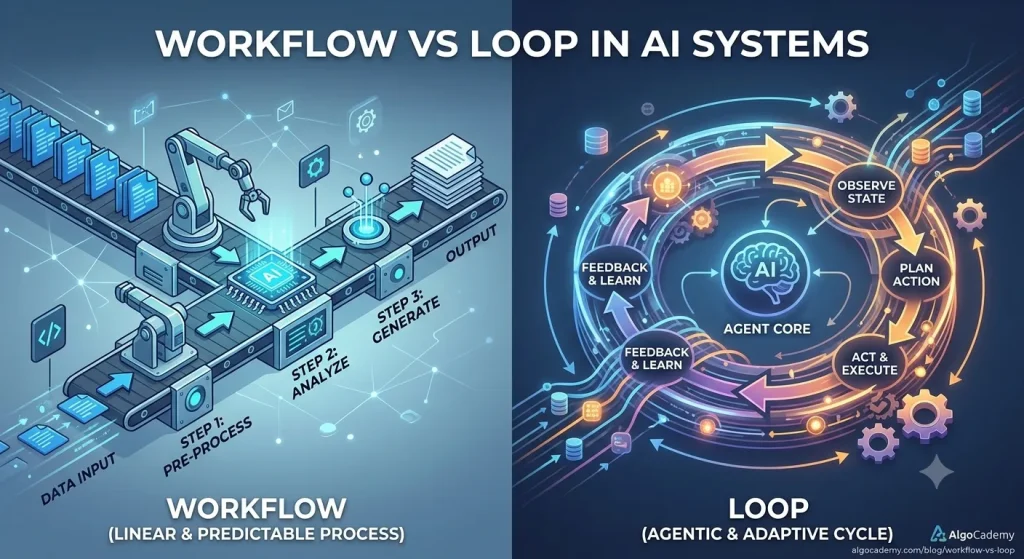
A workflow is a planned sequence of steps.
A loop is a repeated cycle where the system checks, improves, or continues until some condition is met.
In simple terms:
Workflow = do these steps in this order.
Loop = repeat this process until the result is good enough, complete, or stopped.
Understanding the difference helps you build AI systems that are more reliable, cheaper, easier to debug, and less dependent on one giant prompt.
The Simple Difference
A workflow is like a recipe.
A loop is like tasting the food and adjusting until it is right.
For example, imagine you are using AI to write a blog post.
A workflow might look like this:
1. Choose topic
2. Generate outline
3. Write draft
4. Edit draft
5. Generate title
6. Generate meta description
7. Publish
That is a workflow.
It has a beginning, a middle, and an end.
A loop would look like this:
1. Write draft
2. Check draft quality
3. Find weak sections
4. Rewrite weak sections
5. Check again
6. Repeat until quality is acceptable
The workflow moves the task forward.
The loop improves the result.
Both are useful, but they solve different problems.
What Is a Workflow?
A workflow is a structured process for getting from input to output.
It defines what should happen and in what order.
For AI systems, a workflow often breaks a large task into smaller steps.
Instead of asking the model:
Write a great SEO blog post about binary search.
You can create a workflow:
1. Identify search intent.
2. Generate outline.
3. Check outline for missing beginner concepts.
4. Write introduction.
5. Write main explanation.
6. Add examples.
7. Add common mistakes.
8. Add practice exercises.
9. Generate SEO title and meta description.
This is better than one giant prompt because each step is easier to control.
The model does not have to solve everything at once.
It only has to solve one smaller problem at a time.
That makes the system more reliable.
What Is a Loop?
A loop repeats a process until a condition is satisfied.
In AI systems, loops are useful because model outputs are often imperfect on the first attempt.
A loop allows the system to ask:
Is this good enough?
If not, what should change?
Try again.
For example:
1. Generate answer.
2. Check answer against rules.
3. If answer fails, explain the failure.
4. Regenerate answer.
5. Repeat up to 3 times.
That is a loop.
The loop gives the system a chance to self-correct.
But loops need boundaries.
A bad loop can run forever, waste tokens, or make the output worse.
A good loop has:
– A clear goal
– A quality check
– A stopping condition
– A maximum number of attempts
– A fallback if it cannot succeed
Without those constraints, an AI loop becomes chaotic.
Workflow vs Loop
Here is the cleanest way to think about it:
Workflow:
A planned path through a task.
Loop:
A repeated cycle inside or around that path.
A workflow says:
Do A, then B, then C.
A loop says:
Keep doing B until it passes the check.
For example:
Workflow:
Research → Outline → Draft → Edit → Publish
Loop:
Draft → Review → Rewrite → Review → Rewrite
The workflow gives structure.
The loop gives refinement.
Why Workflows Matter
Workflows matter because AI models are not always good at managing complex tasks by themselves.
If you ask a model to do a large task in one shot, it may skip steps.
It may forget constraints.
It may produce something that sounds good but is not actually correct.
A workflow reduces this problem by making the process explicit.
Instead of hoping the model remembers everything, you define the sequence.
For example, in an AI coding tutor, a weak prompt might be:
Help the student understand their mistake.
A workflow might be:
1. Read the problem statement.
2. Read the student’s code.
3. Run the code.
4. Capture the error or failed test case.
5. Identify the likely misconception.
6. Generate a hint.
7. Check that the hint does not reveal the full solution.
8. Return the hint to the student.
This is much more reliable.
The model is not just improvising.
It is following a process.
Why Loops Matter
Loops matter because first outputs are often not good enough.
The first answer may be:
- Too vague
- Too long
- Too confident
- Too generic
- Missing constraints
- Revealing too much
- Not following the requested format
- Failing a test case
A loop allows the system to improve the answer before showing it to the user.
For example, an AI tutor might generate this hint:
You should use a hash map to solve this problem.
But maybe that gives away too much.
A validation step could say:
This hint reveals the main technique too early.
Rewrite it as a more conceptual hint.
Then the model tries again:
Think about whether you need to compare each element with every other element, or whether you can remember useful information as you scan the array.
That is a better beginner hint.
The loop improved the output.
Example: AI Coding Tutor
Let’s imagine you are building an AI tutor for programming students.
The user submits incorrect code.
A simple prompt would be:
Explain what is wrong with this code.
A workflow would be:
1. Detect the programming language.
2. Run the code.
3. Capture compiler errors or failed tests.
4. Compare actual output with expected output.
5. Classify the mistake.
6. Generate an explanation.
7. Generate a small next step.
8. Return the response.
A loop would be:
1. Generate explanation.
2. Check if it gives away the full solution.
3. Check if it is beginner-friendly.
4. Check if it mentions the actual error.
5. If any check fails, rewrite.
6. Stop after the answer passes or after 3 attempts.
The workflow handles the overall task.
The loop improves one part of the task.
Together, they make the tutor feel smarter and more consistent.
Example: AI Content Generation
Now imagine you are building a system that writes educational blog posts.
A simple prompt would be:
Write a blog post about dynamic programming.
A workflow would be:
1. Choose target reader.
2. Identify search intent.
3. Generate outline.
4. Check outline for missing sections.
5. Write draft.
6. Add examples.
7. Add common mistakes.
8. Add conclusion.
9. Generate title.
10. Generate meta description.
A loop would be:
1. Review the draft.
2. Find unclear sections.
3. Rewrite unclear sections.
4. Check again.
5. Repeat until the article is clear enough.
Another loop could check code examples:
1. Extract code snippets.
2. Run code.
3. If code fails, fix it.
4. Run again.
5. Stop when code passes.
This is where AI systems become much more useful.
The model is not just generating content.
The system is checking and improving the content.
Example: AI Coding Agent
Coding agents are built heavily around workflows and loops.
A basic coding agent workflow might be:
1. Understand the user request.
2. Inspect relevant files.
3. Make a plan.
4. Edit code.
5. Run tests.
6. Fix errors.
7. Summarize changes.
The loop is usually around testing:
1. Run tests.
2. If tests fail, read the error.
3. Modify code.
4. Run tests again.
5. Repeat until tests pass or the agent gets stuck.
This is one of the most important patterns in AI coding.
The model does not need to get the solution perfect on the first try.
It needs a loop that lets it observe errors, update its approach, and try again.
That is much closer to how human programmers work.
We write code, run it, see what breaks, fix it, and repeat.
Loops Need Good Stop Conditions
Loops are powerful, but dangerous if they are not controlled.
A loop should not simply say:
Keep improving until perfect.
That is too vague.
The system needs clear stop conditions.
For example:
Stop when:
– All tests pass
– The validator approves the output
– The score is above 8/10
– The answer matches the schema
– The maximum number of attempts is reached
– A human review is required
Good loops also need failure behavior.
For example:
If the answer still fails after 3 attempts:
– Return the best attempt
– Ask for human review
– Use a stronger model
– Show an error message
– Save the case for later analysis
This matters because AI systems should fail gracefully.
A loop without a stopping condition is not intelligence.
It is just uncontrolled repetition.
The Most Common AI Loops
Many AI products use the same basic loop patterns.
1. Generate and Validate
1. Generate output.
2. Check output.
3. Retry if invalid.
Example:
Generate JSON → Validate schema → Retry if malformed
This is one of the simplest and most useful loops.
2. Draft and Critique
1. Generate draft.
2. Critique draft.
3. Rewrite draft.
Example:
Write blog intro → Critique clarity → Rewrite intro
This is useful for writing, marketing, explanations, and teaching.
3. Plan and Execute
1. Make a plan.
2. Execute one step.
3. Observe result.
4. Update plan.
5. Continue.
This is common in AI agents.
The model does not just produce a final answer.
It repeatedly decides what to do next.
4. Test and Fix
1. Write code.
2. Run tests.
3. Read failures.
4. Fix code.
5. Run tests again.
This is the core loop of many coding agents.
5. Retrieve and Refine
1. Search for information.
2. Read results.
3. Identify missing information.
4. Search again.
5. Answer when enough context is available.
This is common in research agents and customer support assistants.
Where Workflows and Loops Fit Inside a Harness
A harness is the full system around the model.
Workflows and loops are usually part of that harness.
You can think of it like this:
Harness
├── Workflow
│ ├── Step 1
│ ├── Step 2
│ ├── Step 3
│ └── Step 4
│
├── Loops
│ ├── Validate and retry
│ ├── Test and fix
│ └── Critique and rewrite
│
├── Skills
├── Tools
├── Memory
├── Guardrails
└── Evals
The workflow defines the path.
The loops improve or repeat parts of the path.
The harness contains both.
The Practical Rule
Here is the simplest mental model:
Prompt = one instruction
Skill = reusable behavior
Workflow = ordered steps
Loop = repeated improvement cycle
Harness = the full system that contains prompts, skills, workflows, loops, tools, validations, and evals
If you are experimenting, you may only need a prompt.
If you are building a repeatable capability, you need a skill.
If you are automating a task, you need a workflow.
If quality matters, you need loops.
If you are building a production AI product, you need a harness.
Why This Matters for Cheaper Models
Workflows and loops are especially important when using cheaper or open-source models.
A frontier model can often handle vague instructions.
A smaller model needs more structure.
Instead of asking a cheap model:
Create a perfect coding lesson.
You can guide it through a workflow:
1. Explain the concept.
2. Generate a simple example.
3. Generate a practice task.
4. Generate a hint.
5. Generate a test case.
6. Validate the answer.
Then you can add loops:
– Retry if the explanation is too advanced.
– Retry if the code does not run.
– Retry if the hint gives away the solution.
This makes the cheaper model more useful.
The intelligence is not only inside the model.
Some of the intelligence is moved into the process.
That is the key idea.
Good AI systems are not just about better models.
They are about better structure.
Final Analogy
Imagine a software team.
A prompt is like telling a developer:
Build the feature.
A skill is like knowing how to build that type of feature.
A workflow is the development process:
Plan → Implement → Review → Test → Deploy
A loop is the debugging cycle:
Run → Fail → Fix → Run again
A harness is the entire engineering system:
Tickets, specs, code editor, tests, CI/CD, code review, monitoring, rollback, and documentation.
AI systems work the same way.
The prompt gives the instruction.
The skill gives the behavior.
The workflow gives the order.
The loop gives the improvement cycle.
The harness makes the whole thing reliable.
If you want to build useful AI products, do not just search for the perfect prompt.
Design the workflow.
Add the right loops.
Then put everything inside a harness that can run, check, improve, and recover.
That is how AI moves from demo to product.



